

A quick reply and team availability are different signals. Connect provides a response-speed report and a connection-time report so you can review both without treating them as the same measure.
| Metric | What it answers | How it is shown |
|---|---|---|
| Response speed | How much time passes between interactions Connect records as replies. | Average minutes, grouped by agent, channel, or category. |
| Connection time | How long a Connect session is recorded for an agent. | Hours by agent and period. |
Review average response time
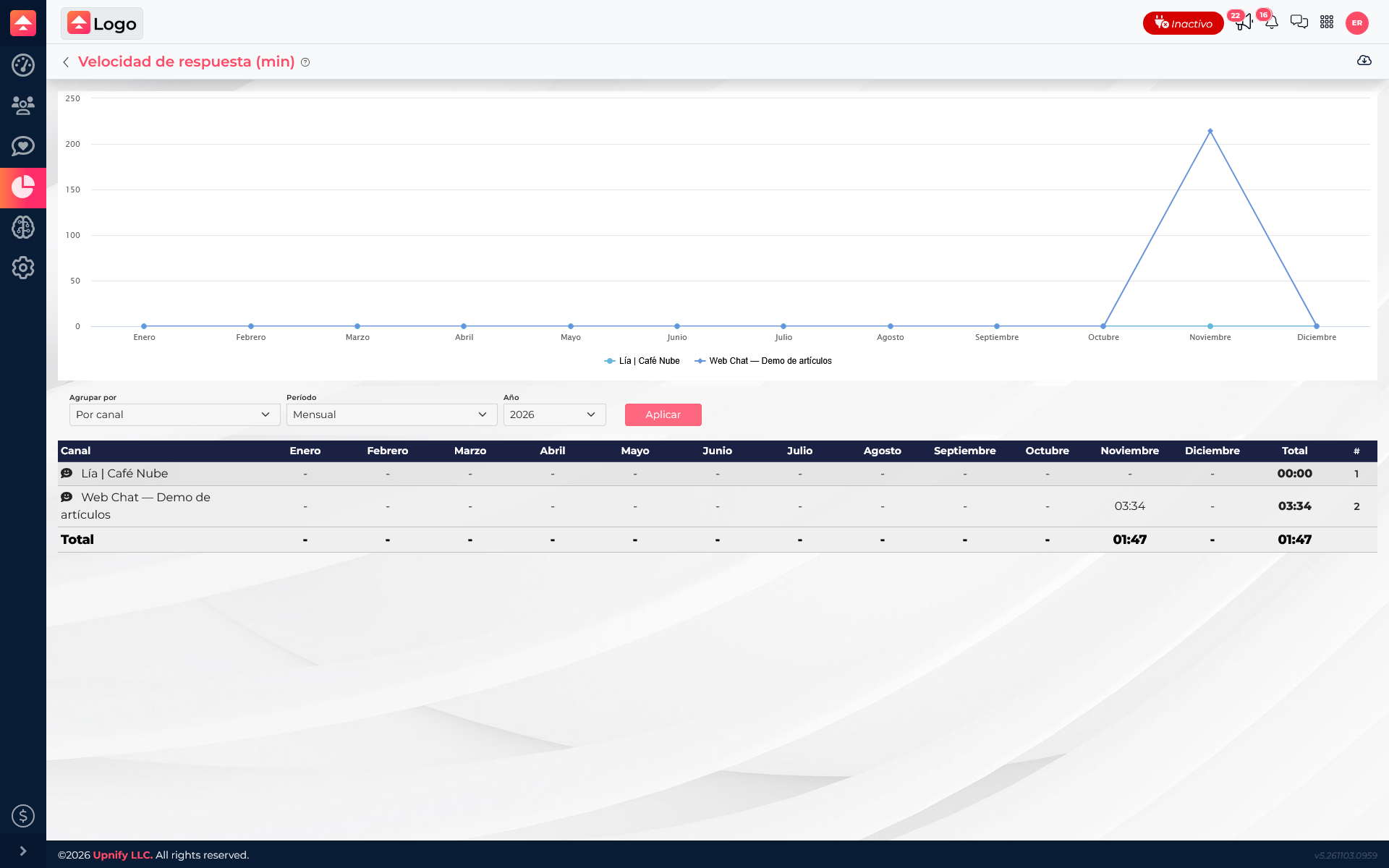
In Reports, open Response Speed. Choose whether to group by agent, channel, or category, select the year, and click Apply. The report shows recorded average response times in minutes for each group and monthly period.
In the demo, Web Chat — Demo de artículos shows 03:34 and Lía | Café Nube shows 00:00; the visible overall average is 01:47. This is an average, so also check how many conversations contribute to each row and open the records if you need context.
This measure refers to response times Connect records between interactions. It is not the total duration of a conversation or the time it took to resolve it.
Review connection time
Open Connection Times. This report groups by agent and shows accumulated hours by monthly, weekly, or daily period. Select the year and, when applicable, the month you want to review; then click Apply.
Connection time represents the duration of Connect sessions recorded for each agent. It helps you understand availability and presence in the tool, but it does not mean that the entire time was spent replying to conversations.
If the view says there is no data, check the period. There may not yet be completed sessions recorded within the selected range. Check again after agents have worked in Connect during that period.
Use both measures together
For example, a supervisor sees that one channel has a higher average response time. First compare equivalent channels and periods, then review the conversations to see whether a few cases or a broader trend drive the average.
Next, check Connection Times to understand whether the agent was available during that period. Connection time adds availability context, while response speed describes recorded response intervals. Neither metric alone measures quality or overall productivity.