
The Sales forecast organizes open opportunities by certainty level and estimated close date. Use it to prepare pipeline reviews: see what amount may fall into the next few periods, identify opportunities that need attention, and compare the pipeline by executive, group, product line, or source.
This is a planning view based on the information saved in CRM. It does not confirm that a sale will happen, and it does not replace reviewing each opportunity with its owner.
Open the report and choose a view
- In CRM, open Reports and select Sales forecast under opportunity reports.
- In Group by, choose the perspective you need. The default view groups by probability; you can also group by executive, group, product line, source, country, region, or product.
- Choose a period: weekly, biweekly, monthly, bimonthly, quarterly, semiannual, or annual.
- If needed, filter by group, executive, or currency, then select Apply.
Read the period columns
The report displays periods following the current date based on the selected frequency. It separates opportunities with an estimated close date in the past under Overdue and dates beyond the visible range under Future. In the monthly view, the visible range may cover the next six months. Check each opportunity’s close date when planning farther ahead.
Understand certainty groups
| Group | Recorded certainty | How to use it |
|---|---|---|
| High | 66% or more. | Review close dates, owners, and actions that could move the decision forward. |
| Medium | 34% to 65%. | Confirm needs, proposal, decision makers, and the next step. |
| Low | 10% to 33%. | Check whether continued effort makes sense or the opportunity should be reclassified. |
Example
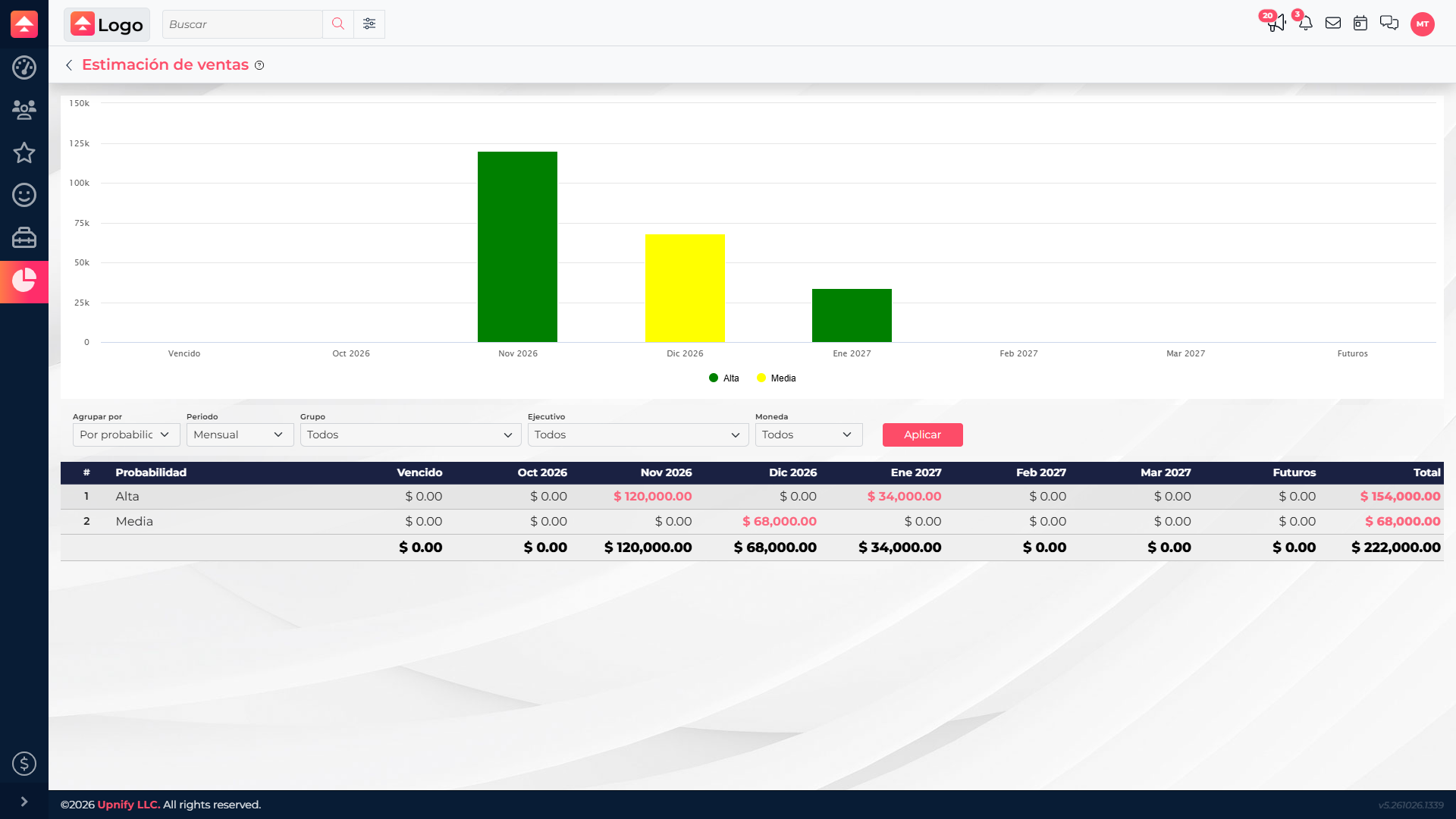
In the screenshot, the probability view shows $154,000 at high certainty and $68,000 at medium certainty, for $222,000 in open pipeline. Of that amount, $120,000 is estimated to close in November, $68,000 in December, and $34,000 in January. This does not mean those amounts have already been sold; use the view to guide reviews and scenario planning.
Review the opportunities behind a total
Select an amount or period to open the opportunities behind it, if your access allows it. Review the concept, amount, certainty, stage, and estimated date with the owner. If a date has changed or the certainty no longer reflects the customer conversation, update the record so later reports use current information.
- An overdue estimated date does not mean the sale was lost; it means the expected close date has passed and should be reviewed.
- Won and lost opportunities are no longer part of the open pipeline in this forecast.
- Keep the same currency and period when comparing results.
- A large total may depend on only a few opportunities; review the details before making hiring, spending, or target decisions.