

CRM templates save messages your sales team uses repeatedly so no one has to start from scratch. They are useful for confirming a meeting, answering a common question, or sending a follow-up with a consistent tone.
Choose a type for your message
| Type | What it prepares | Choose it when... |
|---|---|---|
| Subject and formatted body, personalization tags, and attachments. | You need to explain a proposal, share documents, or send a more complete response. | |
| SMS | A short text of up to 160 characters in the template editor, with available tags. | You want to send a confirmation or update that can be read quickly. The final text may use more than one SMS if inserted values change its length. |
| A reusable message of up to 1,200 characters, with variable and tag selectors. | Your team answers similar questions often or wants a starting message for conversations from CRM. |
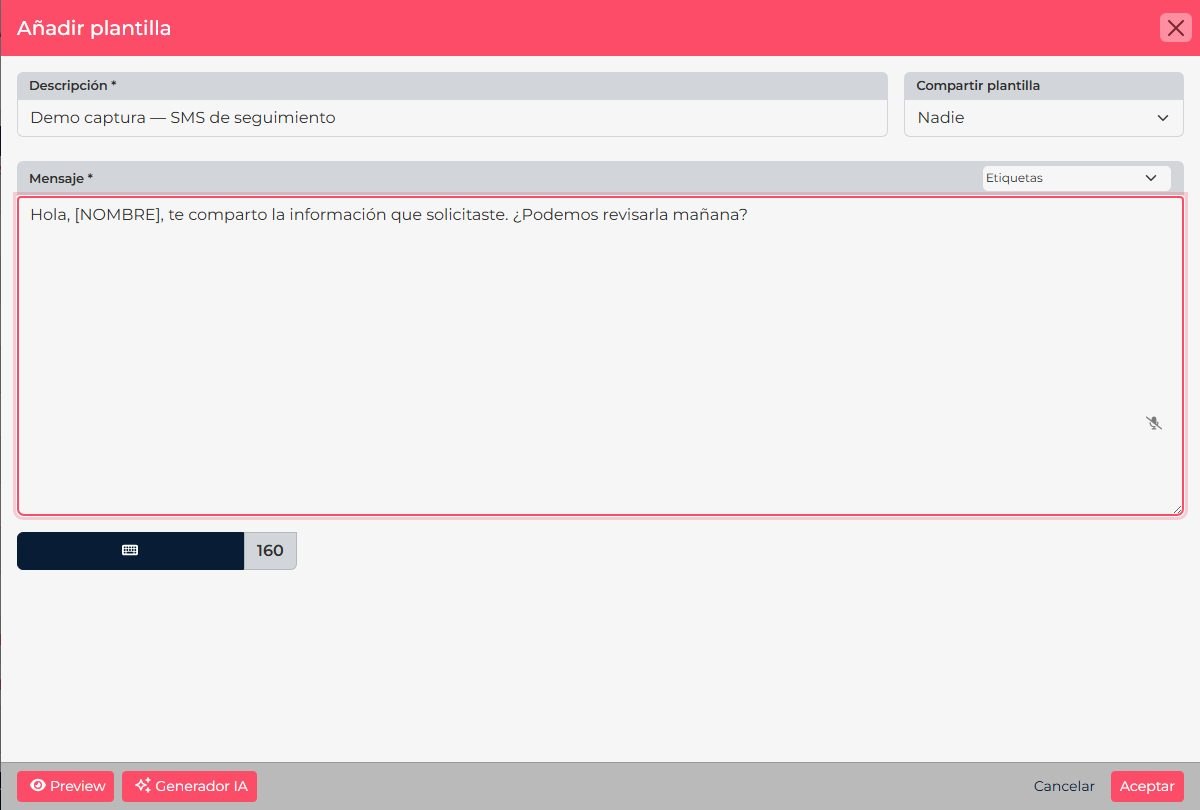
Create a template
- In CRM, open Tools > Templates.
- Select the add option and choose Email, SMS, or WhatsApp.
- Enter a description that makes the purpose clear, such as Call confirmation or Quote follow-up.
- Complete the fields for that type. For email, add a subject and body; for SMS or WhatsApp, write the text in the message field. Insert tags from the selector when needed.
- Choose who can reuse the template: just you, your group, or the company. If shown, you can also share it across Suite apps.
- Save. When you use the template in a message, review the result and personalized values before sending.
CRM WhatsApp and Meta are different: a WhatsApp template saved in Tools > Templates is reusable text for the CRM flow. It is not an official Meta-approved template. Official templates are managed in the WhatsApp Business integration.
After you save
The template becomes available in selectors that support its type and sharing scope. If you cannot find it, confirm that you chose the right type and shared it with the intended team. Before reusing it, check that personalized values and attachments are still appropriate for the contact.
Screenshots show CRM in Spanish. Control names follow the language selected for your account.